Ace Your Next Virtual Interview: English Tips for Zoom and Microsoft Teams
Boost your chances of success in virtual interviews with practical English tips for Zoom and Microsoft Teams. Master camera etiquette, clear communication, and remote job interview skills with Clapingo.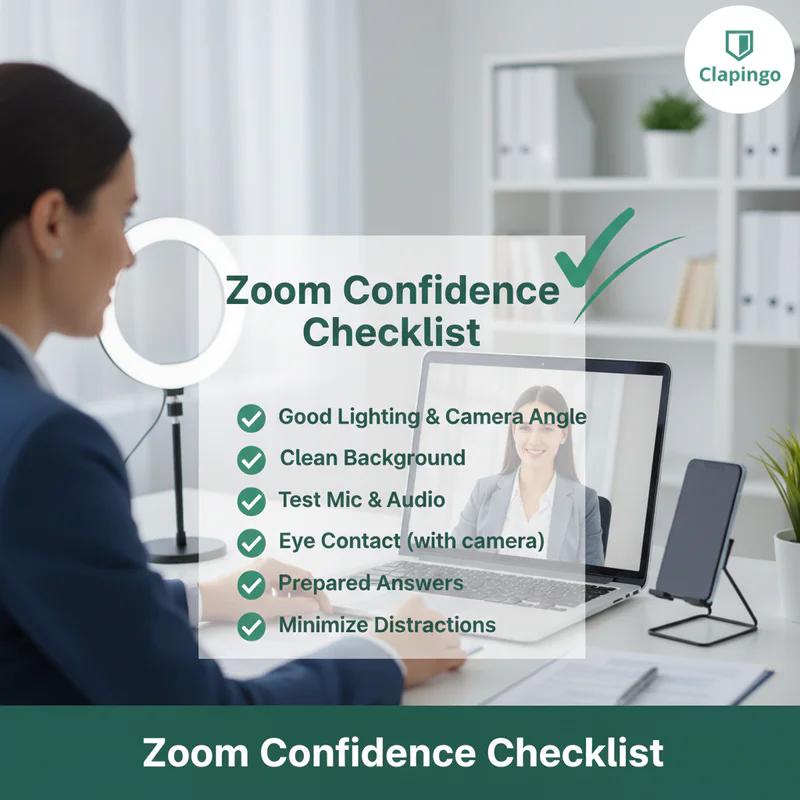
Introduction: The New Era of Job Interviews
A few years ago, job interviews mostly happened in offices. Candidates traveled across cities to attend them. But today, things have changed.
Remote work has become common across industries. As a result, companies now conduct interviews through platforms like Zoom and Microsoft Teams.
For many candidates, this creates a new challenge.
You may have the right skills and experience. But if you cannot communicate clearly in English during a virtual interview, your chances of success may decrease.
A remote job interview requires more than just knowledge. You must also manage:
Online communication
Camera etiquette
Professional body language
Clear voice delivery
Technical setup
This is where virtual interview English skills become important.
When you speak confidently, maintain eye contact with the camera, and sound clear online, interviewers see you as professional and reliable.
In this guide, you will learn practical Zoom interview tips, communication strategies, and preparation techniques to help you succeed.
Why Virtual Interview Skills Matter
A virtual interview may seem easier than an in-person meeting. After all, you are sitting comfortably at home.
But in reality, virtual interviews can be more demanding.
Here are a few reasons why.
Limited Body Language
In an office interview, recruiters observe your full body language. Online, they only see your face and upper body. That means your expressions and tone matter even more.
Technology Can Interrupt Communication
Internet delays or microphone issues can break the flow of conversation. This is why it is important to sound clear online.
First Impressions Are Digital
Your lighting, background, and camera setup create the first impression before you even speak.
A clean setup combined with confident virtual interview English signals professionalism.
Preparing Your Environment for a Virtual Interview
Your surroundings affect how interviewers perceive you.
A messy or noisy environment can distract the recruiter and make you look unprepared.
Ideal Virtual Interview Setup
Extra Setup Tips
Keep your phone on silent mode
Inform family members about your interview
Turn off notifications on your computer
Use headphones to improve audio quality
A professional setup allows recruiters to focus on your answers instead of distractions.
Choosing the Right Platform Settings
Most remote job interviews happen on Zoom or Microsoft Teams.
Although both tools are similar, you should understand their basic settings.
Zoom Interview Tips
Test audio and video before joining
Rename yourself with your full name
Use speaker view if there are many participants
Disable distracting filters
Microsoft Teams Tips
Check meeting link and calendar invite early
Keep your status as available
Test the mute and camera buttons
Learn how to share your screen if needed
When you understand the platform, you feel more confident during the interview.
Virtual Interview English: Speaking Clearly and Professionally
Communication is the heart of any interview.
Your English does not need to be perfect. But it should be clear, confident, and structured.
Here are the key elements of effective virtual interview English.
Speak Slowly
Online audio sometimes has slight delays. Speaking slowly helps interviewers understand you easily.
Use Simple Sentences
Instead of complicated grammar, focus on clarity.
Example:
Weak answer:
"I was sort of involved in various collaborative processes."
Better answer:
"I worked closely with my team to complete the project."
Avoid Filler Words
Common fillers include:
Um
Like
You know
Basically
Reducing fillers helps you sound more professional.
Pause When Needed
Short pauses show confidence and help organize your thoughts.
Camera Etiquette for Online Interviews
Camera behavior plays a big role in a remote job interview.
Recruiters often judge confidence through visual cues.
Important Camera Etiquette Rules
Look into the camera while speaking
Sit upright and maintain good posture
Smile naturally when greeting interviewers
Avoid looking at your phone
Keep gestures calm and controlled
Camera Position Guide
Good camera etiquette helps interviewers connect with you.
How to Sound Clear Online
Audio quality can influence how confident you appear.
Even a strong answer can lose impact if the interviewer struggles to hear you.
Tips to Sound Clear Online
Use headphones or a headset microphone
Speak slightly louder than usual
Sit closer to the microphone
Avoid typing while speaking
Close nearby apps that create background noise
Quick Audio Test Checklist
Microphone working
Headphones connected
Internet stable
Room quiet
Practicing these steps ensures you sound clear online during interviews.
Common Virtual Interview Questions and Sample Answers
Many remote interviews include similar questions.
Preparing answers in advance improves your confidence.
Practice these responses until they feel natural.
Body Language That Builds Confidence
Even though interviews are virtual, body language still matters.
Positive Body Language
Gentle nodding to show listening
Relaxed shoulders
Slight forward lean
Natural facial expressions
Negative Body Language
Slouching
Looking away frequently
Fidgeting
Crossing arms
Professional body language strengthens your virtual interview presence.
Dressing for a Virtual Interview
Many candidates underestimate the importance of appearance during a Zoom interview.
However, recruiters still expect professional presentation.
Best Clothing Choices
Solid colored shirts
Blazers or formal tops
Minimal accessories
Avoid
Loud patterns
Bright neon colors
Casual T-shirts
Dressing professionally also boosts your confidence.
Technical Preparation Before the Interview
Technical issues are one of the biggest risks during remote interviews.
A few simple checks can prevent problems.
Pre-Interview Tech Checklist
These steps ensure the interview runs smoothly.
Handling Technical Problems During the Interview
Even with preparation, problems can happen.
What matters is how you respond.
Example Response
If audio stops working, say:
"I apologize, it seems there is a small audio issue. Could you please repeat the question?"
Stay calm and professional.
Recruiters appreciate candidates who manage unexpected situations gracefully.
Tips for Answering Questions Confidently
Here are strategies that improve response quality.
Use the STAR Method
STAR stands for:
Situation
Task
Action
Result
Example:
Situation: My team faced a deadline challenge.
Task: I was responsible for coordinating the solution.
Action: I organized quick daily check-ins.
Result: We completed the project on time.
This structure makes answers clear and impactful.
Tips & Tricks for Virtual Interview Success
Join the meeting five minutes early
Keep your resume nearby
Maintain eye contact with the camera
Listen carefully before answering
Smile when greeting the interviewer
Small details can create a strong impression.
Did You Know?
Many recruiters say that communication clarity during online interviews influences hiring decisions more than technical skills.
Candidates who demonstrate confidence and clear speech are often remembered longer.
This is why practicing virtual interview English can significantly improve your success rate.
How Clapingo Helps You Prepare for Virtual Interviews
Preparing alone can be difficult.
Many candidates struggle with:
Pronunciation
Fluency
Confidence
Structured answers
This is where Clapingo can help.
Benefits of Practicing with Clapingo
Live one-on-one English coaching
Mock Zoom interview practice
Feedback on pronunciation and tone
Real conversation simulations
These sessions help candidates improve their virtual interview English quickly.
Clapingo Mock Interview Practice
Clapingo tutors simulate real remote job interview environments.
During practice sessions, you learn:
How to introduce yourself confidently
How to structure answers
How to maintain eye contact with the camera
How to sound clear online
This practice builds real confidence before the actual interview.
Post-Interview Communication
Your job is not finished after the interview ends.
Sending a thank-you message is a professional gesture.
Sample Thank-You Email
Subject: Thank You for the Interview Opportunity
Dear [Interviewer Name],
Thank you for taking the time to speak with me today. I enjoyed learning more about your team and the role.
I appreciate the opportunity and look forward to hearing from you.
Best regards,
[Your Name]
Virtual Interview Final Checklist
Before joining the interview, review this checklist.
Camera positioned correctly
Lighting adjusted
Microphone tested
Professional outfit ready
Resume accessible
Water nearby
A quick review helps you feel calm and prepared.
Virtual Interview Mistakes That Can Cost You the Job
Even strong candidates sometimes fail a remote job interview because of avoidable mistakes. Understanding these errors can help you prepare better.
Common Virtual Interview Mistakes
How to Avoid These Mistakes
Always test your microphone to sound clear online
Check your lighting before the interview begins
Practice camera etiquette by looking directly at the webcam
Prepare your answers to improve virtual interview English fluency
Avoiding these small mistakes can significantly increase your chances of success.
A Powerful 30-Second Self-Introduction for Virtual Interviews
Your self-introduction is the first thing recruiters hear. A clear and confident introduction sets the tone for the entire interview.
Ideal Structure for Your Introduction
Your professional background
Key skills and achievements
Why you are excited about the role
Example Self-Introduction
“Hello, thank you for the opportunity. My name is Rahul Sharma. I am a digital marketing professional with four years of experience in SEO and content strategy. In my previous role, I helped increase organic traffic by 40%. I enjoy solving marketing challenges and would love to contribute my experience to your team.”
This type of introduction shows confidence, clarity, and strong virtual interview English.
Tips to Improve Your Introduction
Practice in front of your camera
Keep the introduction under 30–40 seconds
Focus on achievements rather than personal details
Practicing this short introduction is one of the best Zoom interview tips you can follow.
Professional English Phrases to Use During Virtual Interviews
Using the right language can make you sound more confident and professional.
Below are some useful phrases for remote job interviews.
When You Need Time to Think
“That’s an interesting question. Let me think for a moment.”
“I would like to approach this from two perspectives.”
When Clarifying a Question
“Could you please repeat the question?”
“Just to confirm, are you asking about my experience with remote teams?”
When Ending an Answer
“That experience helped me develop strong problem-solving skills.”
“That project strengthened my collaboration abilities.”
These phrases help you maintain clear virtual interview English communication.
How to Build Confidence Before a Remote Job Interview
Confidence plays a major role in how interviewers perceive you.
Many candidates know the answers but struggle because of nervousness.
Simple Confidence Boosting Techniques
Practice speaking aloud
Reading answers silently is not enough. Speak them out loud to improve fluency.
Record your practice sessions
Watch your recordings to improve camera etiquette and body language.
Simulate real interviews
Ask a friend or mentor to conduct a mock interview.
Prepare success stories
Have examples ready for teamwork, leadership, and problem solving.
When you feel prepared, your virtual interview English naturally becomes more confident.
Advanced Zoom Interview Tips Recruiters Notice
Small details can separate average candidates from outstanding ones.
Here are advanced Zoom interview tips that recruiters appreciate.
Use the Camera Strategically
Position your camera slightly above eye level. This creates a confident visual angle.
Keep Digital Notes Ready
Have bullet points ready on your screen. Avoid reading full sentences.
Show Active Listening
Use subtle nodding and facial expressions. These signals show engagement.
Maintain Energy in Your Voice
Speaking with enthusiasm helps you sound clear online and confident.
End the Interview Professionally
Before leaving the meeting, say:
“Thank you for your time today. I enjoyed our conversation and look forward to hearing from you.”
Ending on a positive note leaves a strong final impression.
Conclusion
Virtual interviews have become a standard part of modern hiring.
Success depends not only on your qualifications but also on your ability to communicate effectively online.
By preparing your setup, practicing virtual interview English, maintaining strong camera etiquette, and ensuring you sound clear online, you can confidently handle any remote job interview.
Platforms like Zoom and Microsoft Teams may feel intimidating at first. But with preparation and practice, they can become opportunities to showcase your professionalism.
If you want to improve your communication skills and perform better in interviews, practicing with Clapingo tutors can give you the guidance and confidence you need.
Your next opportunity may be just one virtual interview away.
Read More: https://clapingo.com/blog